Showing posts with label special tricks. Show all posts

forgot the password of ur memory card ?

I have seen such a case when one my friend forgot the password of his memory card of his mobile phone and he have some very important data in the memory card which he want to recover, he tried almost everything then he lost hope and then asked the mobile phone company to find the way to recover the data from the memory card.

Don’t worry if you are having the same problem. Here is a much simple and easy way out.

Requirement: You need a file explorer like FExplorer which you can download from the link below.


Proceadure:

1. Insert card into your phone but don’t access it through phone.
2. Run FExplorer and Open the path C:\system.
3. You will find a file called mmcstore ,rename the file mmcstore.txt
4. Copy that file(mmcstore.txt) to your pc and open that file in notepad.
5. You will find your password in that file.

This method is applicable for all Symbian S60 v2 and S60v3 mobiles. If you are still having a problem breaking password,

 Download Fexplorer


Protected by Copyscape Duplicate Content Detection Tool ©2013 H[+]Tips Zone.
© Legal-Privacy Policy page.
Read More

Download Remote PC Spy software

1. Sniper Spy (Remote Install Supported)
Editors Rating: 9/10


SniperSpy is the industry leading Remote PC Spy softwarecombined with the Remote Install and Remote Viewing feature.

Once installed on the remote PC(s) you wish, you only need to login to your own personal SniperSpy account to view activity logs of the remote PC’s! This means that you can view logs of the remote PC’s from anywhere in the world as long as you have internet access!


Spy on a Remote PC and expose the truth behind the lies! Unlike the rest, SniperSpy allows you to remotely spy any PC like a television! Watch what happens on the screen LIVE! The only remote PC spy software with a SECURE control panel!

This Remote PC Spy software also saves screenshots along with text logs of chats, websites, keystrokes in any language and more. Remotely view everything your child, employee or anyone does while they use your distant PC. Includes LIVE admin and control commands!

SniperSpy Features:
  1. SniperSpy is remotely-deployable spy software
  2. Invisibility Stealth Mode Option. Works in complete stealth mode. Undetectable!
  3. Logs All Keystrokes
  4. Records any Password (Email, Login, Instant Messenger etc.)
  5. Remote Monitor Entire IM Conversations so that you can spy on IM activities too
  6. Captures a full-size jpg picture of the active window however often you wish
  7. Real Time Screen Viewer
  8. Remotely reboot or shutdown the PC or choose to logoff the current Windows user
  9. Completely Bypasses any Firewall
To find why SniperSpy is our No.1 monitoring software, here is the complete review of SniperSpy


Download SniperSpy for Mac

2. Spytech SpyAgent
Editors Rating: 8/10


Spytech Software and Design, Inc. is a privately held company based in Red Wing, Minnesota. The company specializes in security and monitoring software solutions. One of its premiere surveillance applications is Spytech SpyAgent. Numerous, enriched and robust features make the software appropriate for both home and business users.

SpyAgent Spy Software provides a large array of essential computer monitoring features, as well as website and application content filtering, chat client blocking, lockdown scheduling, and remote delivery of logs via email or FTP. SpyAgent's innovative and easy to use feature-set is unmatched, and provides the ultimate all-in-one Spy Software package.

SpyAgent Spy Software Recording Features:

SpyAgent's logging capabilities are unmatched. SpyAgent can log anything ranging from what the user typed and the files they downloaded, to who they talked to and emailed, website searches they performed, programs they ran, and much more - all time stamped by date for easy viewing. All logs can be easily saved, archived, and exported into reports for later use. SpyAgent can be configured to log all users on your computer with ease.

Read the complete review of Spytech SpyAgent

Click Here to Download SpyAgent


Here is a quick comparison between SniperSpy and SpyAgent


Which Monitoring Software to Choose?

First of all we believe that using computer monitoring software is in many ways more convenient than installing a hardware keylogger. When it comes to the question which of the existing programs to choose, users may have doubts. It is quite difficult to develop an application which would satisfy wide range of needs. Unlike the rest, SniperSpy allows you to remotely watch your computer like a television. Watch what happens on the screen live. It is the only remote spy software with a secure control panel. In other hand,SpyAgent runs in total stealth (if chosen) and has the most robust feature-set available on the market. I have personally tried the both, SniperSpy and SpyAgent, and I've been more satisfied with SniperSpy, because of its easy usage, and cool interface. The both softwares are the industry leading Remote PC Spy softwares, so whatever to choose you won't regret.

Download SniperSpy
Download SniperSpy for Mac

Download SpyAgent

Protected by Copyscape Duplicate Content Detection Tool ©2013 H[+]Tips Zone.
© Legal-Privacy Policy page.
Read More

Recover Deleted Files without any software

Hi guys. In this simple tutorial I'm gonna show you how to retrieve the deleted files without any additional software. This trick is for windows 7 or later versions so sorry for Linux and XP users as of now..
Here, I'm sharing a simple example to demonstrate the method. You can use it later independent of file and folder names.
Follow these simple steps..

1) Create a Folder say Office backup (any name)
2) Put any file in it say test.pdf (it could be any file(s) )
3) Now open the folder and simply delete the file
4) Right Click on folder > in the menu click on Restore previous versions
5) Simply click Restore and apply the changes
 6) if you didn't find Restore previous versions option then navigate to Control Panel > System and Security System >System Protection (left pane) > select your drive > click configure > select Restore system settings and previous version of files.

Protected by Copyscape Duplicate Content Detection Tool ©2013 H[+]Tips Zone.
© Legal-Privacy Policy page.
Read More

Android torch app was leaked user data to advertisers.

Millions of Android users have been ‘deceived’ by flashlight app developer who shared ID and location data without permission

GoldenShores Technologies used its Brightest torch app to send exact location and device ID information of its users straight to advertisers. 

The app, that has been downloaded between 50m and 100m times since marc 2011, unbroken robot users within the dark while their non-public information was being illicitly shared with ad networks.

In an interview of the (FTC) criticised GoldenShores for its poor privacy policy, that failed to let individuals understand that the app was work their precise location and a singular symbol for his or her phone and was then sharing that data with advertisers.

To settle the costs, GoldenShores has united to offer users a lot of management over what happens to their information.

Although the free app offered folks AN opt-out clause, the FTC aforementioned this was "meaningless" as a result of information from all users of the Brightest torch app was shared whether or not they united or not,

"When customers have  knowledge about the alternative,then they will decide for themselves whether or not the advantage of a service is definitely worth the info they need to share to use it," aforementioned Jessica wealthy, director of the FTC bureau of client protection, in a very statement.


"But this torch light application take them in the great discussions however their info was reaching to be used," she added.

A settlement deal signed by GoldenShores tightens up its privacy policy and demands that the corporate modifications however it handles information. 

In explicit, GoldenShores should now not misrepresent however it gathers information and whom it's shared with and should provide shoppers significant management over what's through with the knowledge.


In addition, it should delete all the infomation it antecedently gathered from those that downloaded the torch app.
Protected by Copyscape Duplicate Content Detection Tool ©2013 H[+]Tips Zone.
© Legal-Privacy Policy page.
Read More

How to remove removable disk shortcut virus

Recently, i saw many people have been report that their computer or removable drive has disk virus but they don't know how to remove this virus.Last month my laptop has been infected by this virus.But its gone now.This virus will slow down the computer performance by increasin the cpu usage and it has more bad effects.Many people that don't know how to solve this problem end up with formatting his/her computer or removable drive that may have chance to lose some important files.So i'm going to give you a tutorial on how to remove this shortcut virus from your computer or your removable drive. 


1. Disabling the autorun.inf
    Its easy,you just need to remove it's contains
    Go to My Computer > Search > All files and folders > File name - autorun.inf , Look in - My Computer
    or the infected drive , More advance options - Check the Search hidden files and folders > Search
    
    Right click the autorun.inf > Ctrl + A > Backspace > Save and you're done! :)

2. Use an excellent antivirus and antispyware
    I recommend you to use there antivirus and Super Antispyware (Don't worry its free)
    i ) Click here to download Antivirus Avira Personal. Click here for Microsoft Security Essential.
   ii ) Click here to download Super Antispyware
  iii ) Scan your computer or the infected drive with these 2
       softwares.If you have more time, you can scan the whole
       system so that it can remove all the viruses and spywares
       in your computer :)
       Note: Please scan the software after it is downloaded :)

   3. Unhide hidden files and folders
       
       Manual Way:-
       Actually your files and folders are not lost. The virus has made the files and folders become super hidden.
       Go to My Computer > Tools Tab > Folder Options > View > Look for Hidden Files and
       Folders >
       Click at Show hidden files and folders > Check the Hide extensions for known file types and Hide
       protected operating system files > You can see the hidden files and folders now :)

       If that didnt work, you can try this step:
   
       Start > Run ( Command Prompt ) > Type in 'cmd' > Type the infected drive.eg - F: >
       Type in 'attrib -r -a -s -h *.*' > The folders and files should be unhidden by now.
       Your results should be like this:

       Easy way:-
     
       Use the Hidden File Tool software to reveal the hidden files and folders.
       Click here to download the Hidden File Tool.
       Note: Please scan the files after it's downloaded :)
       After you've finished doing the manual or the easy way. The result should be like this picture:


As you can see, the virus name can be buoemx.exe,cxpoaxx.exe and others.Just delete the virus and the autoron.inf files and you're done! Your computer is cleaned from virus and spyware by now! :)
Protected by Copyscape Duplicate Content Detection Tool ©2013 H[+]Tips Zone.
© Legal-Privacy Policy page.
Read More

Make your computer talk what you type !


This is very good and interesting 
Visual Basic Script Trick which let your computer speaks whatever you type. There is no requirement of any software. Just follow below simple steps.

  • First open Notepad and copy below codes
     Dim message, sapi
      message=InputBox("What do you want me to say?","COOL HACKING TRICKS")
     Set sapi=CreateObject("sapi.spvoice")
     sapi.Speak message
  • Now save the notepad file as talk.vbs
  • Now close the notepad file and open it again.
  • Done !!!
Protected by Copyscape Duplicate Content Detection Tool ©2013 H[+]Tips Zone.
© Legal-Privacy Policy page.
Read More

Rename Your Recycle Bin

                                                   
       1. Go to Start > Run
       2. Type in regedit this will open Registry Editor.

       3. Go to HKEY_CLASSES_ROOT/CLSID/{645FF040-5081-101B-9F08-00AA002F954E}

       4. Change "Recycle Bin" to whatever you want.
Protected by Copyscape Duplicate Content Detection Tool ©2013 H[+]Tips Zone.
© Legal-Privacy Policy page.
Read More

What is Session?

Photo: "Access your Personal Computer from Anywhere"

If you are traveling and you need a file which resides in your Personal Computer then what will you do?

Don’t worry I am here to help you Folks.

Today I  came up with a very important topic “Access your Personal Computer from Anywhere” Through Remote PC you can access your personal computer from anywhere in the world!!!

Opera Unite, by using this tool one can easily turn his computer into a web server and can access documents on that computer from any other web browser. This Tutorial is posted By Cyber Elite.Opera Unite is a standard web server and it allows us to download files directly from the computer without uploading.

Copernic is popular desktop accessing software that is used to find emails, pictures and other files on Windows computer. Copernic also have a component called myCopernic on the Go for remotely searching the content stored on the home or office computer. One can preview the search results and then download them to your mobile phone or remote PC.

Another option is GBridge , it allows you to setup a virtual private network using your Google Account. Now a day’s many companies are using VPNs to let employees access their data over an unsecure public network (Internet) with this tool. It also allows home users to build their own VPNs to access remote files more securely.

But in my personal opinion the best option is Windows Live Sync at sync.live.com for remotely accessing files over the Internet. You have to just install the Live Sync client on your computer and you can access the entire hard drive of that computer simply through the Windows Live Sync website.

Live Sync is available for both Mac and Windows.

Follow The Admin :- Namit Behl
HTTP communicates with lot of TCP connections, Server should create unique identifer for each Connection.


A Session is a unique identifier that is generated and sent to the client from a server in order to identify the Current Interaction Session.

Whenever you visit a webpage or login to website, the server will store the data about you in your system as a cookie. This cookies will help to identify you.

For example , you are login to Facebook.com. when you login to your account, a cookie will be generated and stored in your local system. if you click the logout, cookies will be destroyed.

Software Implementation:
TCP sessions are implemented using Multi threading concept. Whenever session is generated , a new thread will be created.

HTTP sessions are typically not implemented using one thread per session, but by means of a database with information about the state of each session.

Server side web sessions:
The sessions are stored in Server Machine.

Client side web sessions:
Client-side sessions use cookies . This will reduce the server side storage.

This is best method but there is one drawback. Sessions stored in client is vulnerable to tampering by the hackers. This can be overcome by encrypting the session(but hackers are able to decrypt it also).

HTTP session token

The client usually stores and sends the token as an HTTP cookie and/or sends it as a parameter in GET or POST queries.

The reason to use session tokens is that the client only has to handle the identifier. All session data is stored on the server (usually in a database, to which the client does not have direct access) linked to that identifier.

Magic cookie is simply a cookie that is used to authenticate the user on remote server or simply computer. In general, cookies are used to maintain the sessions on the websites and store the remote address of the website. 
Protected by Copyscape Duplicate Content Detection Tool ©2013 H[+]Tips Zone.
© Legal-Privacy Policy page.

Read More

Tips To Make Your Old PC Or Laptop New!


Upgrading Hardware


If you’re okay with spending some money on hardware upgrades, it’s recommended! However, before you make any changes to your hardware, you should backup your system first.

Memory

By adding more memory to your machine is the easiest way to enhance performance of an older machine.


Graphics Card

You can even choose to upgrade its graphics card to enhance your computer’s performance, specially when your motherboard has integrated graphics. In case, you are unsure of type of expansion slots you have, make use of the utility SIW, which is available for free.

Hard Drive

By getting a larger and faster hard drive is another way to enhance the performance of your PC. In most laptops, the hard drive is 4200RPM, and it is possible to upgrade to a 5400 or 7200RPM drive that should enhance read/write performance.

CPU

If you’re an advanced user, it is highly recommended that you upgrade your Desktop CPU in order to improve its performance. You need to find out what CPUs are compatible with your motherboard and chipset.

Reinstall 
Windows

After extensive use, Windows OS starts slowing down. It is likely to happen even when you do regular maintenance such as using Disk Cleanup, defragmentation of your hard drive, and cleaning of your system with utilities such as CCleaner. But, before you reinstall your OS, you need to ensure that you backup your crucial data!

Use Portable Apps

If you want to avoid installing a bunch of new software on your old machine, you might consider taking a look at Portable Apps. You can run these from your USB flash drive and they don’t need any installation. You can save your data to the flash drive without clogging up your local drive. Also, you’ll have the additional benefit of bringing your favorite apps to any machine.

Install a Light Version of Linux

Puppy Linux

If your older laptop is running XP and doesn’t have the power to run Windows 7 OS adequately, check out Puppy Linux that can be used to add life to it. It is only 130MB and comfortably runs on any machine from the past 15 years. These Tips Are Provided By Cyber Elite.You just need a Pentium 166MMX CPU and 128MB of RAM as minimum requirement.

DSL Linux

DSL is another light Linux distro which is small in size and just like Puppy Linux is possible to from a Live CD, flash drive. You can even install it inside Windows. It is only 50MB in size and can run on machines with 16MB of RAM!
Protected by Copyscape Duplicate Content Detection Tool ©2013 H[+]Tips Zone.
© Legal-Privacy Policy page.
Read More

RAR Password Unlocker


Have you ever forgotten the password of a protected R
AR file that you downloaded from Internet? If your answer is yes, then don't worry because RAR Password Unlocker will find it out for you.

The program has three recovery options; the dictionary attack, the absolute brute force attack which will test every possible word combination, and the mask attack which is the same as brute force, but will save a lot of time by allowing you to specify a known part of the password or some symbols that should compose it.

The auto-save option enables you to automatically save the progress of the cracking process every certain number of minutes, so you can resume it whenever it's interrupted without having to start from the beginning again.

Once the program has found your lost password, you can choose to remove it from the file and remove the write protection password as well.
The speed of the cracking process will depend on the priority level that you have chosen for the program, idle or high, and also on your computer's hardware.


                                                        Trusted DOWNLOAD 12.7 MB


Protected by Copyscape Duplicate Content Detection Tool ©2013 H[+]Tips Zone.
© Legal-Privacy Policy page.
Read More

How to Create Your Own Media Player in Vb.net?

We All Know About Windows Media Player Or Other Players That use to Play a Audio And Video File in Your Computer OR Laptops or etc… But Any Body Know how to make it … ? 
Don’t know …. ok … ok … i will teach you how to make it…. 
In this Tutorial We Use Visual Basic 2008 To make Our Own Media Player…. 
ok…. let’s Start….
1. Open  Vb.net and Create New Windows Application ….
2. Give it Name MY Media Player…
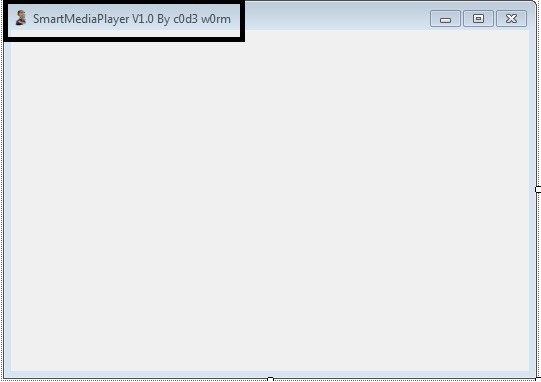
3. Change the Text of Form1 to Your Own one … like My Media Player, Smart Media Player etc…. (Here I use Smart Media Player…. )
Mpalyer1
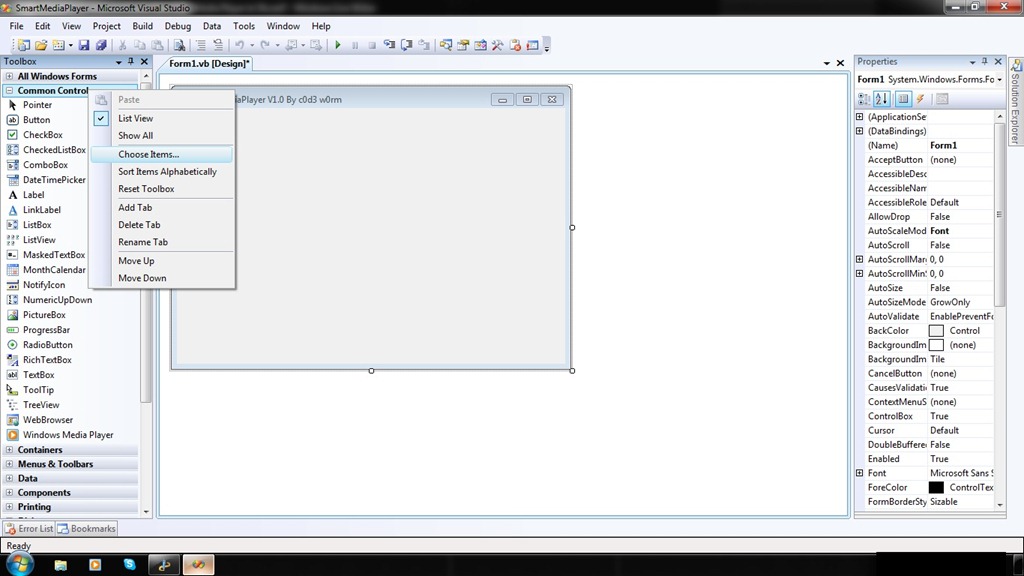
4. Ok … now Add COM Component… From Chose Items …
      Follow this ….
    mpalye2
   mpalyer3.
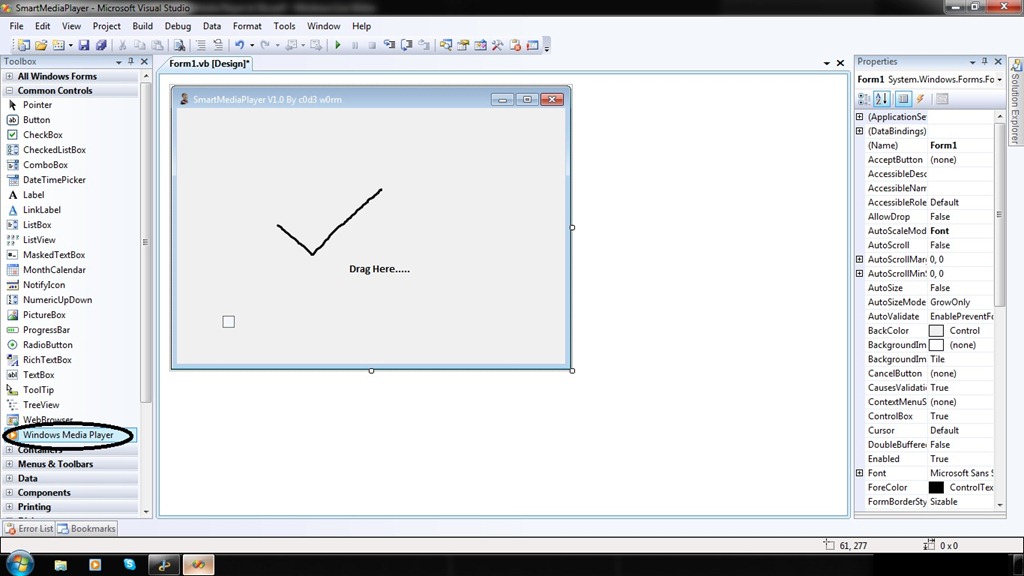
5. Now You can See new Toll Windows Medial Player In Tool Box Control…. Drag It into Form….
mpalyer4
6. Now You Can See One Little Control Same Look Like Windows Media Player….. Drag and Drop it into Form….
7. Ohhh…. see there is one little Medial player… oh … Interesting …
mpalye5
8. Hey Congrat’s you done it …. now Double Click on Play Button and you can See code Window….

            In this Write Following lines of Codes….
         
                     AxWindowsMediaPlayer1.URL = "z:\Songs\xyz.mp3”       // You file Path Will be goes here……
           You Can make Your Own Playlist and Write this Code In SelectedIndexChanged  Event of List box and Combo Box…..
9.  Now … .Double Click on Stop Button and Write Following Lines of Codes ….

                     AxWindowsMediaPlayer1.Ctlcontrols.stop()
10. Do Same For Following Buttons …. 
  
             1. Pause :-  AxWindowsMediaPlayer1.Ctlcontrols.pause() 
             2.Prev":-     AxWindowsMediaPlayer1.Ctlcontrols.previous()
       Do same For many other  Controls….

11. Now Run your Application … See it Work ….
Protected by Copyscape Duplicate Content Detection Tool ©2013 H[+]Tips Zone.
© Legal-Privacy Policy page.
Read More

How To Modify .apk Files


The extension Google uses for Android applications  (APK) may seem a bit complicated at first, but it really isn’t. In fact, an .apk is nothing else than a .zip file disguised as an .apk. That’s dumbing it down, but you get it. Essentially, if one wanted to see what’s inside an app, they would just change the extension ofapplicationname.apk to applicationname.zip, unzip it.  And there you have it: The contents of the .apk!  We aren’t done yet, read more after the break.
Here is where it gets tricky. Inside the folder where you unzipped the contents of the application, you’ll find a file named classes.dex. That’s the most important file of the whole application, containing all the java files, but it’s encrypted!  No worries, that can easily be solved. You’ll need two things:
  1. Dex2Jar from http://code.google.com/p/dex2jar/
  2. A regular Java decompiler, such as JD from http://java.decompiler.free.fr
Copy classes.dex to the folder where you unzipped Dex2Jar, and run from the commandline: “dex2jar.bat classes.dex”
This will produce a file, strangely named something like: “classes.dex.dex2jar.jar” If you have WinRAR installed, you can just unpack the files. If you don’t, install it.
Now go ahead and adjust it to your liking!

Protected by Copyscape Duplicate Content Detection Tool ©2013 H[+]Tips Zone.
© Legal-Privacy Policy page.
Read More

HOW TO MAKE WINDOWS 7 GENUINE USING COMMAND PROMPT

Have You Ever thought of Making Windows 7 Genuine Using Command Prompt Directly Without Using any Activation Crack or Loader ? 

So Today Here in this Post I am Going to Tell you a very Simple Procedure to Make Your Windows 7 Genuine Using Command Prompt.Because of the High Cost of Original Windows 7 Not Everyone Can afford to buy Original Microsoft Windows 7 So they Prefer to Use Cracked or Pirated Versions of Windows.Because of the Use of Pirated Copy of Windows they often face the Error “Windows 7 is not genuine” and because of this they are Unable to Change the Desktop Background Settings and Control Panel Settings.So Here is A Step by Step Guide on How to Make Windows 7 Genuine Using Command Prompt Without Using any Activation Cracks.


First of all You need to Open Cmd ( Command Prompt ) as an Administrator.To Open it as an Administrator Type cmd in Start-menu and then Right Click on the Cmd and Select Run as Administrator as Shown below in the Image.


Now Type the Command SLMGR -REARM in cmd as Shown below in the ImageHow to Make Windows 7 Genuine Using Command Prompt
Press Enter and Wait For Few Seconds
Next a Message Dialog Box Will open Specifying Command ‘ Completed Successfully.Please Restart the system for the Changes to Take effect ‘ as 
Shown below in the ImageHow to Make Windows 7 Genuine Using Command Prompt
Restart Your Computer and You are all done.Now You are Free of the Error
‘Windows 7 is Not Genuine’
Note - You Must Run Command Prompt as an Administrator Else this Method Will Not Work

Read More

­


­

­

­

Receive all updates via Facebook. Just Click the Like Button Below...

Get this Here

Powered By DecodedReview.com · Designed By Rajput Gaurav·© All right received Legal-Privacy Policy ©