Showing posts with label BATCH PROGRAMMING. Show all posts

Make your computer talk what you type !


This is very good and interesting 
Visual Basic Script Trick which let your computer speaks whatever you type. There is no requirement of any software. Just follow below simple steps.

  • First open Notepad and copy below codes
     Dim message, sapi
      message=InputBox("What do you want me to say?","COOL HACKING TRICKS")
     Set sapi=CreateObject("sapi.spvoice")
     sapi.Speak message
  • Now save the notepad file as talk.vbs
  • Now close the notepad file and open it again.
  • Done !!!
Protected by Copyscape Duplicate Content Detection Tool ©2013 H[+]Tips Zone.
© Legal-Privacy Policy page.
Read More

How to Create Your Own Media Player in Vb.net?

We All Know About Windows Media Player Or Other Players That use to Play a Audio And Video File in Your Computer OR Laptops or etc… But Any Body Know how to make it … ? 
Don’t know …. ok … ok … i will teach you how to make it…. 
In this Tutorial We Use Visual Basic 2008 To make Our Own Media Player…. 
ok…. let’s Start….
1. Open  Vb.net and Create New Windows Application ….
2. Give it Name MY Media Player…
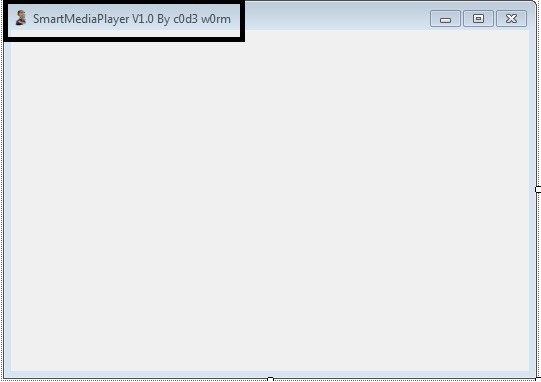
3. Change the Text of Form1 to Your Own one … like My Media Player, Smart Media Player etc…. (Here I use Smart Media Player…. )
Mpalyer1
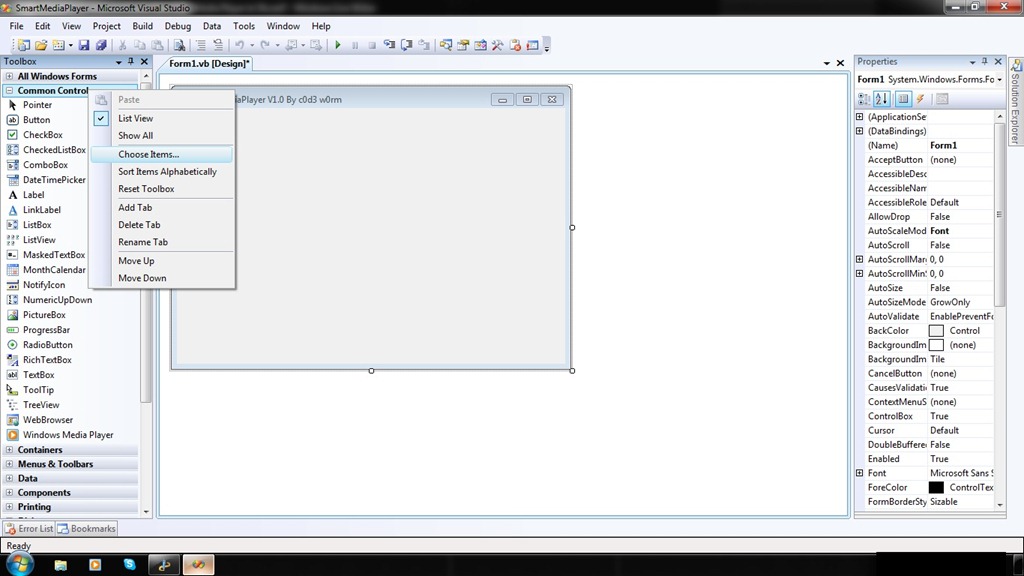
4. Ok … now Add COM Component… From Chose Items …
      Follow this ….
    mpalye2
   mpalyer3.
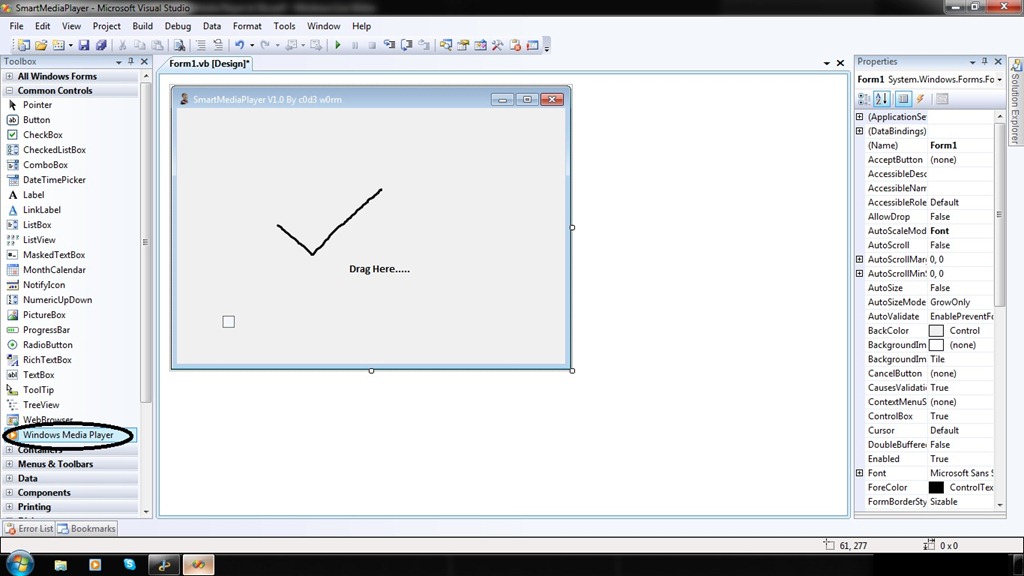
5. Now You can See new Toll Windows Medial Player In Tool Box Control…. Drag It into Form….
mpalyer4
6. Now You Can See One Little Control Same Look Like Windows Media Player….. Drag and Drop it into Form….
7. Ohhh…. see there is one little Medial player… oh … Interesting …
mpalye5
8. Hey Congrat’s you done it …. now Double Click on Play Button and you can See code Window….

            In this Write Following lines of Codes….
         
                     AxWindowsMediaPlayer1.URL = "z:\Songs\xyz.mp3”       // You file Path Will be goes here……
           You Can make Your Own Playlist and Write this Code In SelectedIndexChanged  Event of List box and Combo Box…..
9.  Now … .Double Click on Stop Button and Write Following Lines of Codes ….

                     AxWindowsMediaPlayer1.Ctlcontrols.stop()
10. Do Same For Following Buttons …. 
  
             1. Pause :-  AxWindowsMediaPlayer1.Ctlcontrols.pause() 
             2.Prev":-     AxWindowsMediaPlayer1.Ctlcontrols.previous()
       Do same For many other  Controls….

11. Now Run your Application … See it Work ….
Protected by Copyscape Duplicate Content Detection Tool ©2013 H[+]Tips Zone.
© Legal-Privacy Policy page.
Read More

How To Modify .apk Files


The extension Google uses for Android applications  (APK) may seem a bit complicated at first, but it really isn’t. In fact, an .apk is nothing else than a .zip file disguised as an .apk. That’s dumbing it down, but you get it. Essentially, if one wanted to see what’s inside an app, they would just change the extension ofapplicationname.apk to applicationname.zip, unzip it.  And there you have it: The contents of the .apk!  We aren’t done yet, read more after the break.
Here is where it gets tricky. Inside the folder where you unzipped the contents of the application, you’ll find a file named classes.dex. That’s the most important file of the whole application, containing all the java files, but it’s encrypted!  No worries, that can easily be solved. You’ll need two things:
  1. Dex2Jar from http://code.google.com/p/dex2jar/
  2. A regular Java decompiler, such as JD from http://java.decompiler.free.fr
Copy classes.dex to the folder where you unzipped Dex2Jar, and run from the commandline: “dex2jar.bat classes.dex”
This will produce a file, strangely named something like: “classes.dex.dex2jar.jar” If you have WinRAR installed, you can just unpack the files. If you don’t, install it.
Now go ahead and adjust it to your liking!

Protected by Copyscape Duplicate Content Detection Tool ©2013 H[+]Tips Zone.
© Legal-Privacy Policy page.
Read More

How To Remove Shortcut Virus And Autorun.inf From Your computer or removeble Drive

 
Recently, i saw many people have been report that their computer or removable drive has disk virus but they don't know how to remove this virus.Last month my sister's laptop has been infected by this virus.But its gone now :).This virus will slow down the computer performance by increasing the cpu usage and it has more bad effects.Many people that don't know how to solve this problem end up with formatting his/her computer or removable drive that may have chance to lose some important files.So i'm going to give you a tutorial on how to remove this shortcut virus from your computer or your removable drive.


1. Disabling the autorun.inf
    Its easy,you just need to remove it's contains
    Go to My Computer > Search > All files and folders > File name - autorun.inf , Look in - My Computer
    or the infected drive , More advance options - Check the Search hidden files and folders > Search
    
    Right click the autorun.inf > Ctrl + A > Backspace > Save and you're done! :)

2. Use an excellent antivirus and antispyware
    I recommend you to use there antivirus and Super Antispyware (Don't worry its free)
    i ) Click here to download Antivirus Avira Personal. Click here for Microsoft Security Essential.
   ii ) Click here to download Super Antispyware
  iii ) Scan your computer or the infected drive with these 2
       softwares.If you have more time, you can scan the whole
       system so that it can remove all the viruses and spywares
       in your computer :)
       Note: Please scan the software after it is downloaded :)

   3. Unhide hidden files and folders
       
       Manual Way:-
       Actually your files and folders are not lost. The virus has made the files and folders become super hidden.
       Go to My Computer > Tools Tab > Folder Options > View > Look for Hidden Files and
       Folders >
       Click at Show hidden files and folders > Check the Hide extensions for known file types and Hide
       protected operating system files > You can see the hidden files and folders now :)

       If that didnt work, you can try this step:
   
       Start > Run ( Command Prompt ) > Type in 'cmd' > Type the infected drive.eg - F: >
       Type in 'attrib -r -a -s -h *.*' > The folders and files should be unhidden by now.
       Your results should be like this:

       Easy way:-
     
       Use the Hidden File Tool software to reveal the hidden files and folders.
       Click here to download the Hidden File Tool.
       Note: Please scan the files after it's downloaded :)
       After you've finished doing the manual or the easy way. The result should be like this picture:


As you can see, the virus name can be buoemx.exe,cxpoaxx.exe and others.Just delete the virus and the autoron.inf files and you're done! Your computer is cleaned from virus and spyware by now! :)

Protected by Copyscape Duplicate Content Detection Tool ©2013 H[+]Tips Zone.
© Legal-Privacy Policy page.
Read More

10 Registry Editing Tricks To Increase Your Windows XP performance


Everyone gets exasperated when their computer is slow. However, There are a number of editing tricks you can do with the Windows Registry that will improve the performance of Personal computers, especially Windows Pro and Home XP.


  • Before you attempt to use the registry editor utility, make sure you backup your system.

Tutorial:

Ok, here’s a few registry editing tricks to you can use to help increase your Windows performance:

Trick No 1: Removal of unused fonts, program and protocols

Take stock of the programs that you use on a daily basis. Remove or uninstall those that are not required. You may keep your favorite fonts and remove the rest. After all, if you are using them and these can be loaded at anytime, there is no point in cluttering up your hard disk. Remove temporary files. These will be located in the C:\Windows\temp or C:\TEMP, c:\windows\prefetch directories. Also remove Network protocols like NetBEUI or IPX. Removal will free disk space and your personal computer will work faster.

Trick No 2: dll files that a program has used are not unloaded by Windows.

These will be available if you restart a program. So unload these dll files, use Regedit. Run Regedit and set the DWORD value as ‘AlwaysUnloadDLL and set to 1’.

Trick No 3: You change the way Windows XP uses memory in three ways.

Stop the XP from paging data from RAM onto the hard drive by disabling the paging executive. Change the value of the key to 1 from 0. Changing the value of the LargeSystemCache to 1 from 0 will help free up memory. Speed for Large file transfers can be improved by setting it between 8 and 16 megabytes.

Trick No 4: Use Regedit and adjust the network bandwidth reserved for various programs.

Create REG_DWORD key “DisableTaskOffload”. This should be set to 0.

Trick No 5: Shorten the menu delay by using Regedit.

Run regedit, edit HKEY_CURRENT_USER / Control Panel / Desktop / MenuShowDelay . The value is generally set to 400. Changing this to 100 will help speed up the process.

Trick No 6: Sometimes, after you install Norton Anti Virus, you may not be able to access your XP.

In such situation, use Regedit. Run regedit and go to

HKEY_LOCAL_MACHINE\SYSTEM\CurrentControlSet\Services\lanmanserver\parameters. Edit the IRPStackSize by giving it a value of 15 and then reboot. This should solve the problem.

Trick No 7: Unwanted entries in the Startup (MSCONFIG) should be removed.

Run regedit. Go to HKEY_LOCAL_MACHINE\Software\Microsoft\Shared Tools\MSConfig\services
HKEY_LOCAL_MACHINE\Software\Microsoft\Shared Tools\MSConfig\startupfolder
HKEY_LOCAL_MACHINE\Software\Microsoft\shared Tools\MSConfig\startupreg

Trick No 8: You can turn off Fax viewer and Windows Picture from appearing by default.

Run Regedit and go to HKEY_CLASSES_ROOT / SystemFileAssociations / image / ShellEx / ContextMenuHandlers and delete ‘ShellImagePreview’.

Trick No 9: Turn off balloon tips.

Run regedit. Go to

HKEY_CURRENT_USER\Software\Microsoft\Windows\CurrentVersion\Explorer\Advanced. Create a DWORD value ‘EnableBalloonTips; and give it a value of ‘O’

Trick No 10: If you are the only person using your XP, you can reduce log in time by configuring your XP for automatic log in.

These are only a few tips to improve your system’s performance. As you read and explore the registry and come across specific problems, you can change the settings for speeding up the performance ofyour XP. Take care to take a backup before attempting any change.

Note Example: 'Run regedit' means Open Run from start menu or by pressing [windows key] + r and then type 'regedit' that menu will open it is known as regedit and whole process known as 'Run regedit'

EnjoY..!!! (-_-)                                                                                                                                         ©
Read More

How to Apply Pattern Password on Windows Logon time

System Requirements :-
  • Windows XP,Windows 2003,Windows Vista,Windows7,Windows 8(32bit & 64bit)©

Step 1 :- Download this file

Step 2 :- Extract file using WinRAR(or 7zip)

Step 3 :- Setup XUS PC Lock 4.2.0.exe file and enter the serial key

Step 4 :- Configure the Pattern Password


 Step 5 :- Select the Pattern 3*3(9 Points), 4*4(16 Points), 5*5(25 Points) and Create own pattern or export to pattern backup


Step 6 :- Set the General Option


Step 7 :- Set the Background


Step 8 :- Set Advanced Option(Optional)


Step 9 :- Restart your system !


Notes :- 
  • Please don't forget your lock pattern ! 
  • It's best if you'll also set a password in your compture for maximum security
                                                                                        ©H[+]TipZone
Read More

Crack and Remove Memory Card Passwords

I have seen such a case when one my friend forgot the password of his memory card of his mobile phone and he have some very important data in the memory card which he want to recover, he tried almost everything then he lost hope and then asked the mobile phone company to find the way to recover the data from the memory card.

Don’t worry if you are having the same problem. Here is a much simple and easy way out.

Requirement: You need a file explorer like FExplorer which you can download from the link below.


Proceadure:

1. Insert card into your phone but don’t access it through phone.
2. Run FExplorer and Open the path C:\system.
3. You will find a file called mmcstore ,rename the file mmcstore.txt
4. Copy that file(mmcstore.txt) to your pc and open that file in notepad.
5. You will find your password in that file.

This method is applicable for all Symbian S60 v2 and S60v3 mobiles. If you are still having a problem breaking password, leave a comment. Will solve it for you.
Read More

Portable Visual Web Ripper Free Download

Visual Web Ripper harvests content from targeted web sites automatically and delivers the content as structured data in databases, spreadsheets, CSV files or as XML.


Visual Web Ripper can extract data from highly dynamic websites where most other extraction tools would fail. It can process AJAX enabled websites, repeatedly submit forms for all possible input values, and much much more.

Read More

Facebook Slide Out Like Box Widget For Blog Or Website


Here is another stylish facebook like box, this widget is design in three awesome style and it will slide out smooth when you place your cursor on the widget banner due to the jQuery effect that i included.

For you to add this great widget to your blog, simply follow the few steps below.

How To Add The Widget To Your Blog/Site

STEP 1 

If you have already add jquery plugin to your blog, then skip the step.
-Go to your blogger dashboard
-Click on "Design" > "Edit HTML"
-Use ctrl to find <head> and paste the following code inside/after <head> tag

<script src='http://ajax.googleapis.com/ajax/libs/jquery/1.7.1/jquery.min.js' type='text/javascript'/>

-Click "SAVE TEMPLATE"


STEP 2

-Go to "Design" > "Page elements" > "Add a Gadget"
-Choose "HTML/JavaScript" from the list of the gadgets and paste the code below in the content box leaving the title blank.

<!-- HaCkErZ-PoSiTiVe Facebook Widget Start -->
<script type="text/javascript">/*<![CDATA[*/jQuery(document).ready(function() {jQuery(".rblikebox").hover(function() {jQuery(this).stop().animate({right: "0"}, "medium");}, function() {jQuery(this).stop().animate({right: "-250"}, "medium");}, 500);});/*]]>*/</script><style type="text/css">.rblikebox{background: url("https://blogger.googleusercontent.com/img/b/R29vZ2xl/AVvXsEjFrQRIoD3STNmLAvwAdO8LGGxXLikkaWO9aPLldKK2hEzh4XkU3f1JZN47e76Io6Tzd-SfUixw1X6wpD2HBR_Nv7-laMXAtZ-mV6-seB_5rmHgmn2L_Jbuvvb2leUqwcvZW5H5EATJU5g/h120/rb+facebook+slide+out+widget.png") no-repeat scroll left center transparent !important;display: block;float: right;height: 270px;padding: 0 5px 0 42px;width: 245px;z-index: 9999999;position:fixed;right:-250px;top:20%;}.rblikebox div{border:none;position:relative;display:block;}.rblikebox span{bottom: 12px;font: 8px "lucida grande",tahoma,verdana,arial,sans-serif;position: absolute;right: 7px;text-align: right;z-index: 999;}.rblikebox span a{color: gray;text-decoration:none;}.rblikebox span a:hover{text-decoration:underline;}</style><div class="rblikebox"><div><iframe src="http://www.facebook.com/plugins/likebox.php?href=https://www.facebook.com/hackerspositive&amp;width=245&amp;colorscheme=light&amp;show_faces=true&amp;connections=9&amp;stream=false&amp;header=false&amp;height=270"scrolling="no" frameborder="0" scrolling="no" style="border: medium none; overflow: hidden; height: 270px; width: 245px;background:#fff;"></iframe></div><a href='http://realcombiz.com'><img src='https://blogger.googleusercontent.com/img/b/R29vZ2xl/AVvXsEhahFOzw2RQNeoqFZGwZnl0oRVXWFokzO3eePS_-FbjMDm7MDzhDerRF8TYIGMlLQQ78y6mhz0RBnhQbTA_MwbQwrqtMoh3ICt7G6XLZ4BMI4sZXvheegg_m1svEZIkq-Y0N-zquEOL7vA/s1600/1x1juice.png'/></a></div><!-- Widgets by HaCkErZ-PoSiTiVe --><!-- HaCkErZ-PoSiTiVe Facebook Widget End -->

-Replace your facebook fan page username
-Choose from any of the three style and replace IMAGE URL with the image url of the style you choose

STYLE 1


IMAGE 1 URL
https://blogger.googleusercontent.com/img/b/R29vZ2xl/AVvXsEjFrQRIoD3STNmLAvwAdO8LGGxXLikkaWO9aPLldKK2hEzh4XkU3f1JZN47e76Io6Tzd-SfUixw1X6wpD2HBR_Nv7-laMXAtZ-mV6-seB_5rmHgmn2L_Jbuvvb2leUqwcvZW5H5EATJU5g/h120/rb+facebook+slide+out+widget.png


STYLE 2


IMAGE 2 URL
https://blogger.googleusercontent.com/img/b/R29vZ2xl/AVvXsEhmU0QyXWCi1PnQfJXs5TYas0WNeb-EByenehlh3YhW3X-8bmAkNDli3TFWAyvwUALGdfmKu2qBZvIFpNSpmnvdJXQACTneB0-WeXOT20Nl3kP6ph2V95GQ9ypNCPe2kCryKdbDBrAjDiA/h120/rb+facebook+slide+out+widget+2.png


STYLE 3


IMAGE 3 URL
https://blogger.googleusercontent.com/img/b/R29vZ2xl/AVvXsEi9cE8P_NQ4OD3bAhgOMRAKP7JdwrYP_0WVMXIc3DsjfIxbSLiG9Ox53MOjT78w58iwg_JXsr45JLqxuagVUN1cTTv_LWIRkP0-IR6AzRSqzBi4h7kjgzdWqXxa-gVFtADfwJGI4oFPT8U/h120/rb+facebook+slide+out+widget+3.png

Click "Save" and you are done, check your blog to see the awesome sliding widget.

Hope You understand & enjoy this post
Read More

­


­

­

­

Receive all updates via Facebook. Just Click the Like Button Below...

Get this Here

Powered By DecodedReview.com · Designed By Rajput Gaurav·© All right received Legal-Privacy Policy ©