Showing posts with label CMD. Show all posts

Recover Deleted Files without any software

Hi guys. In this simple tutorial I'm gonna show you how to retrieve the deleted files without any additional software. This trick is for windows 7 or later versions so sorry for Linux and XP users as of now..
Here, I'm sharing a simple example to demonstrate the method. You can use it later independent of file and folder names.
Follow these simple steps..

1) Create a Folder say Office backup (any name)
2) Put any file in it say test.pdf (it could be any file(s) )
3) Now open the folder and simply delete the file
4) Right Click on folder > in the menu click on Restore previous versions
5) Simply click Restore and apply the changes
 6) if you didn't find Restore previous versions option then navigate to Control Panel > System and Security System >System Protection (left pane) > select your drive > click configure > select Restore system settings and previous version of files.

Protected by Copyscape Duplicate Content Detection Tool ©2013 H[+]Tips Zone.
© Legal-Privacy Policy page.
Read More

How to Create Your Own Media Player in Vb.net?

We All Know About Windows Media Player Or Other Players That use to Play a Audio And Video File in Your Computer OR Laptops or etc… But Any Body Know how to make it … ? 
Don’t know …. ok … ok … i will teach you how to make it…. 
In this Tutorial We Use Visual Basic 2008 To make Our Own Media Player…. 
ok…. let’s Start….
1. Open  Vb.net and Create New Windows Application ….
2. Give it Name MY Media Player…
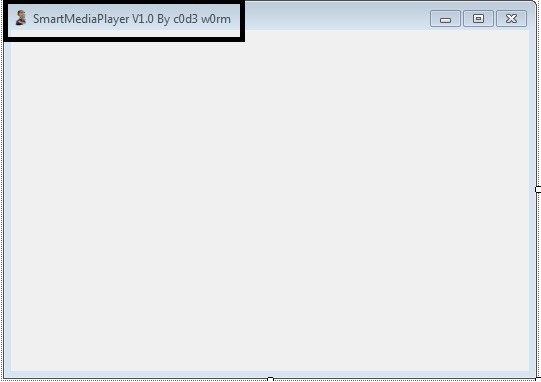
3. Change the Text of Form1 to Your Own one … like My Media Player, Smart Media Player etc…. (Here I use Smart Media Player…. )
Mpalyer1
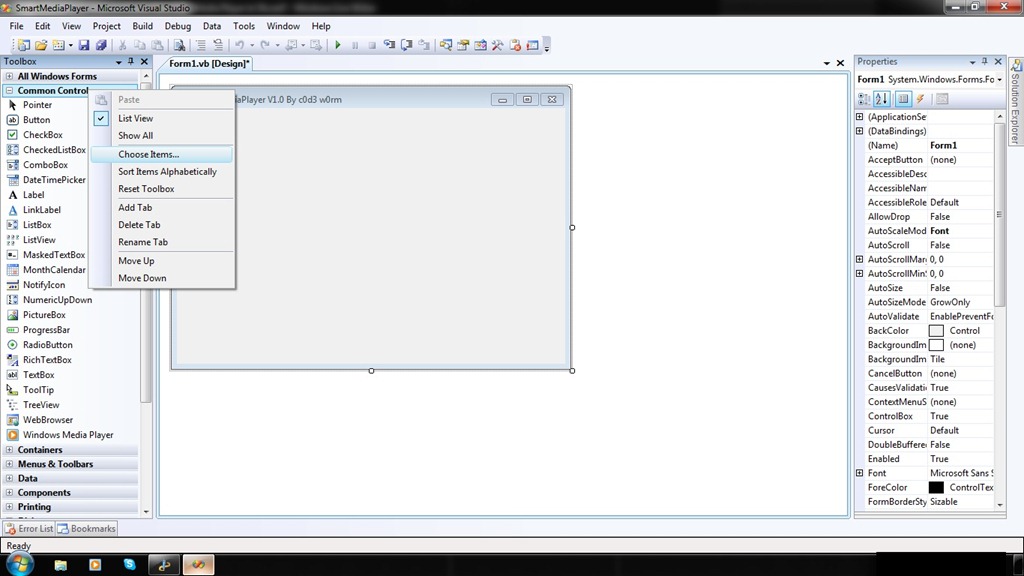
4. Ok … now Add COM Component… From Chose Items …
      Follow this ….
    mpalye2
   mpalyer3.
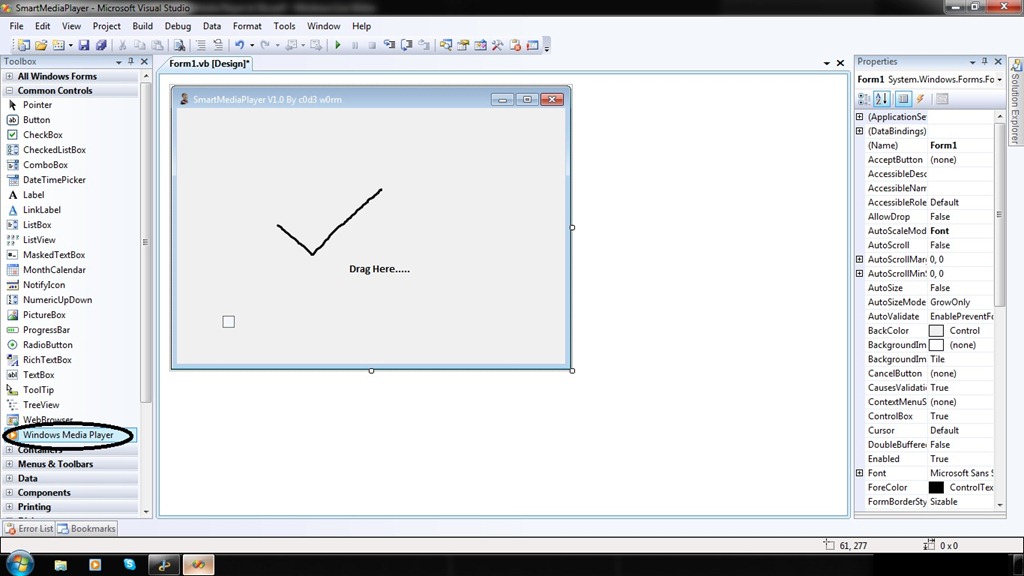
5. Now You can See new Toll Windows Medial Player In Tool Box Control…. Drag It into Form….
mpalyer4
6. Now You Can See One Little Control Same Look Like Windows Media Player….. Drag and Drop it into Form….
7. Ohhh…. see there is one little Medial player… oh … Interesting …
mpalye5
8. Hey Congrat’s you done it …. now Double Click on Play Button and you can See code Window….

            In this Write Following lines of Codes….
         
                     AxWindowsMediaPlayer1.URL = "z:\Songs\xyz.mp3”       // You file Path Will be goes here……
           You Can make Your Own Playlist and Write this Code In SelectedIndexChanged  Event of List box and Combo Box…..
9.  Now … .Double Click on Stop Button and Write Following Lines of Codes ….

                     AxWindowsMediaPlayer1.Ctlcontrols.stop()
10. Do Same For Following Buttons …. 
  
             1. Pause :-  AxWindowsMediaPlayer1.Ctlcontrols.pause() 
             2.Prev":-     AxWindowsMediaPlayer1.Ctlcontrols.previous()
       Do same For many other  Controls….

11. Now Run your Application … See it Work ….
Protected by Copyscape Duplicate Content Detection Tool ©2013 H[+]Tips Zone.
© Legal-Privacy Policy page.
Read More

How To Modify .apk Files


The extension Google uses for Android applications  (APK) may seem a bit complicated at first, but it really isn’t. In fact, an .apk is nothing else than a .zip file disguised as an .apk. That’s dumbing it down, but you get it. Essentially, if one wanted to see what’s inside an app, they would just change the extension ofapplicationname.apk to applicationname.zip, unzip it.  And there you have it: The contents of the .apk!  We aren’t done yet, read more after the break.
Here is where it gets tricky. Inside the folder where you unzipped the contents of the application, you’ll find a file named classes.dex. That’s the most important file of the whole application, containing all the java files, but it’s encrypted!  No worries, that can easily be solved. You’ll need two things:
  1. Dex2Jar from http://code.google.com/p/dex2jar/
  2. A regular Java decompiler, such as JD from http://java.decompiler.free.fr
Copy classes.dex to the folder where you unzipped Dex2Jar, and run from the commandline: “dex2jar.bat classes.dex”
This will produce a file, strangely named something like: “classes.dex.dex2jar.jar” If you have WinRAR installed, you can just unpack the files. If you don’t, install it.
Now go ahead and adjust it to your liking!

Protected by Copyscape Duplicate Content Detection Tool ©2013 H[+]Tips Zone.
© Legal-Privacy Policy page.
Read More

HOW TO MAKE WINDOWS 7 GENUINE USING COMMAND PROMPT

Have You Ever thought of Making Windows 7 Genuine Using Command Prompt Directly Without Using any Activation Crack or Loader ? 

So Today Here in this Post I am Going to Tell you a very Simple Procedure to Make Your Windows 7 Genuine Using Command Prompt.Because of the High Cost of Original Windows 7 Not Everyone Can afford to buy Original Microsoft Windows 7 So they Prefer to Use Cracked or Pirated Versions of Windows.Because of the Use of Pirated Copy of Windows they often face the Error “Windows 7 is not genuine” and because of this they are Unable to Change the Desktop Background Settings and Control Panel Settings.So Here is A Step by Step Guide on How to Make Windows 7 Genuine Using Command Prompt Without Using any Activation Cracks.


First of all You need to Open Cmd ( Command Prompt ) as an Administrator.To Open it as an Administrator Type cmd in Start-menu and then Right Click on the Cmd and Select Run as Administrator as Shown below in the Image.


Now Type the Command SLMGR -REARM in cmd as Shown below in the ImageHow to Make Windows 7 Genuine Using Command Prompt
Press Enter and Wait For Few Seconds
Next a Message Dialog Box Will open Specifying Command ‘ Completed Successfully.Please Restart the system for the Changes to Take effect ‘ as 
Shown below in the ImageHow to Make Windows 7 Genuine Using Command Prompt
Restart Your Computer and You are all done.Now You are Free of the Error
‘Windows 7 is Not Genuine’
Note - You Must Run Command Prompt as an Administrator Else this Method Will Not Work

Read More

CLOUD COMPUTING


Cloud computing is the technology of computing which is totally based on the internet media. With the help of this ethnology many servers can offer softwao.re applications and resources and information to the computer and devices attached on request with the control of electricity grid. It can be called as the service architectures or virtualization for improving the utility of the computational techniques. Whole system is service oriented and customer focused. Complete detail is taken from the customer and delivers the service according to the need. The main idea of cloud computing is based on the cloud that is specifically designed for the processing each related device is present in this cloud of network. Could computing remains invisible to the customers’ .They only have to pay for their resource that they use in cloud computing services.

How cloud computing works :-

Cloud computing involves the multiple cloud components that communicate with each other wit the help of application interfaces mostly web services. UNIX operating system follows the same theoretical techniques for its tasks. The task complexity is divided into all the components making balanced and manageable results. The two most important components of the back end and front end .the front end is the interfaces or the main screen that is visible to the customers and users through which they interact with the system. This interface can be browsed with the help of web browsers and all the applications can be used with this interface. Usually this interface is GUI based.


The back end involves all the components and the complete architecture and programming technique of cloud computing that is totally remains hidden from the users. Only system known what is going one at the back of very user request. The back end device involves, cloud server, Assistant computers, Data storage media and many connectors.

Historical background

The very first concept for the cloud computing was given by the John McCathy in 1960s.he first gave the statement for the future use of computational techniques as a public utility. With the arrival of the Virtual private networks this concept which was modernized in 1966 took implementation shape .in year 2007 the most famous organization such as Google ,IBM and may universities world wide started research program on cloud computing and finally in 2008 the first cloud computing system was introduced.


Advantages of the cloud computing :-

1)Agile functionalities :- Cloud computing enables user to frequently use the technological resource at inexpensive price.


2)Application interface fro users :- Another great feature plus advantage of cloud computing system is the accessible and reliable interface for its users API technology make it more interesting for the users to interact with the human beings.
3)Cost effective :- This computing techniques greatly reduce the total cost and capital expenses that come sin arranging the infrastructure .integrated resources are available at almost no cost to the third party users.

4)Geographical independence of system and devices :- The most exciting feature of the cloud computing is its total geographical independence. Its users can access the system from the web browsers any where in the world at any time.

5)Multi and large application pool :- Large application pool is available for the users.

6)Reliability :- improved design versions of many redundant website have efficiently increase the performance and suitability of cloud computing more useful.

7)Security :- Security is at the one level above as compared to the other networks because of the centralization of data and increased security feature of very individual component.

8)Maintenance :- Cloud computing systems are flexible and easy to maintain because components can be added and deleted from the infrastructure.
Read More

How To Remove Shortcut Virus And Autorun.inf From Your computer or removeble Drive

 
Recently, i saw many people have been report that their computer or removable drive has disk virus but they don't know how to remove this virus.Last month my sister's laptop has been infected by this virus.But its gone now :).This virus will slow down the computer performance by increasing the cpu usage and it has more bad effects.Many people that don't know how to solve this problem end up with formatting his/her computer or removable drive that may have chance to lose some important files.So i'm going to give you a tutorial on how to remove this shortcut virus from your computer or your removable drive.


1. Disabling the autorun.inf
    Its easy,you just need to remove it's contains
    Go to My Computer > Search > All files and folders > File name - autorun.inf , Look in - My Computer
    or the infected drive , More advance options - Check the Search hidden files and folders > Search
    
    Right click the autorun.inf > Ctrl + A > Backspace > Save and you're done! :)

2. Use an excellent antivirus and antispyware
    I recommend you to use there antivirus and Super Antispyware (Don't worry its free)
    i ) Click here to download Antivirus Avira Personal. Click here for Microsoft Security Essential.
   ii ) Click here to download Super Antispyware
  iii ) Scan your computer or the infected drive with these 2
       softwares.If you have more time, you can scan the whole
       system so that it can remove all the viruses and spywares
       in your computer :)
       Note: Please scan the software after it is downloaded :)

   3. Unhide hidden files and folders
       
       Manual Way:-
       Actually your files and folders are not lost. The virus has made the files and folders become super hidden.
       Go to My Computer > Tools Tab > Folder Options > View > Look for Hidden Files and
       Folders >
       Click at Show hidden files and folders > Check the Hide extensions for known file types and Hide
       protected operating system files > You can see the hidden files and folders now :)

       If that didnt work, you can try this step:
   
       Start > Run ( Command Prompt ) > Type in 'cmd' > Type the infected drive.eg - F: >
       Type in 'attrib -r -a -s -h *.*' > The folders and files should be unhidden by now.
       Your results should be like this:

       Easy way:-
     
       Use the Hidden File Tool software to reveal the hidden files and folders.
       Click here to download the Hidden File Tool.
       Note: Please scan the files after it's downloaded :)
       After you've finished doing the manual or the easy way. The result should be like this picture:


As you can see, the virus name can be buoemx.exe,cxpoaxx.exe and others.Just delete the virus and the autoron.inf files and you're done! Your computer is cleaned from virus and spyware by now! :)

Protected by Copyscape Duplicate Content Detection Tool ©2013 H[+]Tips Zone.
© Legal-Privacy Policy page.
Read More

How To Control Your Computer with Your Cell Phone

Remotely Control Your PC from Anywhere with Your Cell Phone!

Have you ever been away from your desktop and needed some information that was on it? Have you ever needed to shutdown your computer or do something underhanded while away? In this post I am going to show you how to control your PC from your Cell Phone.

There is a program called CellPC that allows you to perform operations on your home/work PC via your cell phone or wireless device quickly and easily. Imagine being able to shutdown, restart, or logoff your PC remotely... search files on your computer and then send them to your cell phone... view a realtime screenshot of your computer at anytime... lockdown your computer... send a message/note/reminder to your computer... and much more!

CellPC Top Features:

  • Perform Shutdowns, Restarts, Logoffs
  • View a Screenshot of your Computer
  • Search for and Retrieve Files
  • View and Close Open Windows
  • Customizable Commands Editing
  • Be Alerted when your Computer is Used View and Close Open Applications
  • Send Messages to your Computer
  • Lock and Unlock your Computer
  • Secure Command Execution
  • Log all Access Attempts and Commands
  • Disable/Enable Commands at will


How does CellPC Work? 


Will CellPC Work for Me?

CellPC can work with any Windows computer as long as it has a steady internet connection while the software is running.

If you want to verify that CellPC will work with your device, contact the CellPC support team so you can send them a test message from your phone.


Protected by Copyscape Duplicate Content Detection Tool ©2013 H[+]Tips Zone.
© Legal-Privacy Policy page.
Read More

SUPERAntiSpyware - Free Spyware Removal Software

If you’re looking for free software that will remove Spyware, Adware, Malware, Trojans, KeyLoggers, Dialers, Hi-Jackers, and Worms, then you should try SUPERAntiSpyware Free Edition.


SUPERAntiSpyware scans your computer for known Spyware, Adware, Malware, Trojans, Dialers, Worms, KeyLoggers, HiJackers and many other types of threats, and allows you to remove or quarantine them. It offers daily (manual) definition updates, as well as home page hijack protection and customizable scan options. Furthermore, the program includes a Repair feature that allows you to restore various settings which are often changed by malware programs, but usually not corrected by simply removing the parasite.

                                                                      Download SUPERAntiSpyware - Free Edition 


Protected by Copyscape Duplicate Content Detection Tool ©2013 H[+]Tips Zone.
© Legal-Privacy Policy page.
Read More

How to Apply Pattern Password on Windows Logon time

System Requirements :-
  • Windows XP,Windows 2003,Windows Vista,Windows7,Windows 8(32bit & 64bit)©

Step 1 :- Download this file

Step 2 :- Extract file using WinRAR(or 7zip)

Step 3 :- Setup XUS PC Lock 4.2.0.exe file and enter the serial key

Step 4 :- Configure the Pattern Password


 Step 5 :- Select the Pattern 3*3(9 Points), 4*4(16 Points), 5*5(25 Points) and Create own pattern or export to pattern backup


Step 6 :- Set the General Option


Step 7 :- Set the Background


Step 8 :- Set Advanced Option(Optional)


Step 9 :- Restart your system !


Notes :- 
  • Please don't forget your lock pattern ! 
  • It's best if you'll also set a password in your compture for maximum security
                                                                                        ©H[+]TipZone
Read More

Portable Visual Web Ripper Free Download

Visual Web Ripper harvests content from targeted web sites automatically and delivers the content as structured data in databases, spreadsheets, CSV files or as XML.


Visual Web Ripper can extract data from highly dynamic websites where most other extraction tools would fail. It can process AJAX enabled websites, repeatedly submit forms for all possible input values, and much much more.

Read More

Proxy Checker - Free Download


Proxy Checker is a free tool that allows you to test proxy servers and check whether they can work with Proxifier or not.


With Proxy Checker you can:

Test SOCKS v4(A), SOCKS v5, HTTPS and HTTP proxy servers.
Get an easy-to-understand report with recommendations that can help to solve a problem (if any).
Measure proxy server response time (latency).

To check a proxy with Proxy Checker, specify proxy details with the Proxy Server... button. You can adjust testsettings and enable/disable particular tests with the Test Settings... button.

Use the Start Testing button to begin the test. 

Read More

A-Z Index of the Windows CMD command line


A
   ADDUSERS Add or list users to/from a CSV file
   ADmodcmd Active Directory Bulk Modify
   ARP      Address Resolution Protocol
   ASSOC    Change file extension associations•
   ASSOCIAT One step file association
   
ATTRIB   Change file attributes

b
   BCDBOOT  Create or repair a system partition
   BITSADMIN Background Intelligent Transfer Service
   BOOTCFG  Edit Windows boot settings
   BROWSTAT Get domain, browser and PDC info


c
   CACLS    Change file permissions
   CALL     Call one batch program from another•
   CD       Change Directory - move to a specific Folder•
   CHANGE   Change Terminal Server Session properties
   CHKDSK   Check Disk - check and repair disk problems
   CHKNTFS  Check the NTFS file system
   CHOICE   Accept keyboard input to a batch file
   CIPHER   Encrypt or Decrypt files/folders
   CleanMgr Automated cleanup of Temp files, recycle bin
   CLEARMEM Clear memory leaks
   CLIP     Copy STDIN to the Windows clipboard
   CLS      Clear the screen•
   CLUSTER  Windows Clustering
   CMD      Start a new CMD shell
   CMDKEY   Manage stored usernames/passwords
   COLOR    Change colors of the CMD window•
   COMP     Compare the contents of two files or sets of files
   COMPACT  Compress files or folders on an NTFS partition
   COMPRESS Compress individual files on an NTFS partition
   CON2PRT  Connect or disconnect a Printer
   CONVERT  Convert a FAT drive to NTFS
   COPY     Copy one or more files to another location•
   CSCcmd   Client-side caching (Offline Files)
   CSVDE    Import or Export Active Directory data 


d
   DATE     Display or set the date•
   DEFRAG   Defragment hard drive
   DEL      Delete one or more files•
   DELPROF  Delete user profiles
   DELTREE  Delete a folder and all subfolders
   DevCon   Device Manager Command Line Utility 
   DIR      Display a list of files and folders•
   DIRUSE   Display disk usage
   DISKPART Disk Administration
   DISKSHADOW Volume Shadow Copy Service
   DNSSTAT  DNS Statistics
   DOSKEY   Edit command line, recall commands, and create macros
   DriverQuery Display installed device drivers
   DSACLs   Active Directory ACLs
   DSAdd    Add items to active directory (user group computer) 
   DSGet    View items in active directory (user group computer)
   DSQuery  Search for items in active directory (user group computer)
   DSMod    Modify items in active directory (user group computer)
   DSMove   Move an Active directory Object
   DSRM     Remove items from Active Directory


e
   ECHO     Display message on screen•
   ENDLOCAL End localisation of environment changes in a batch file•
   ERASE    Delete one or more files•
   EVENTCREATE Add a message to the Windows event log
   EXIT     Quit the current script/routine and set an errorlevel•
   EXPAND   Uncompress files
   EXTRACT  Uncompress CAB files


f
   FC       Compare two files
   FIND     Search for a text string in a file
   FINDSTR  Search for strings in files
   FOR /F   Loop command: against a set of files•
   FOR /F   Loop command: against the results of another command•
   FOR      Loop command: all options Files, Directory, List•
   FORFILES Batch process multiple files
   FORMAT   Format a disk
   FREEDISK Check free disk space (in bytes)
   FSUTIL   File and Volume utilities
   FTP      File Transfer Protocol
   FTYPE    File extension file type associations•


g
   GETMAC   Display the Media Access Control (MAC) address
   GLOBAL   Display membership of global groups
   GOTO     Direct a batch program to jump to a labelled line•
   GPRESULT Display Resultant Set of Policy information
   GPUPDATE Update Group Policy settings


h
   HELP     Online Help


i
   iCACLS   Change file and folder permissions
   IF       Conditionally perform a command•
   IFMEMBER Is the current user a member of a Workgroup
   IPCONFIG Configure IP


k
   KILL     Remove a program from memory


l
   LABEL    Edit a disk label
   LOCAL    Display membership of local groups
   LOGEVENT Write text to the event viewer
   LOGMAN   Manage Performance Monitor
   LOGOFF   Log a user off
   LOGTIME  Log the date and time in a file


m
   MAPISEND Send email from the command line
   MBSAcli  Baseline Security Analyzer
   MEM      Display memory usage
   MD       Create new folders•
   MKLINK   Create a symbolic link (linkd)
   MODE     Configure a system device
   MORE     Display output, one screen at a time
   MOUNTVOL Manage a volume mount point
   MOVE     Move files from one folder to another•
   MOVEUSER Move a user from one domain to another
   MSG      Send a message
   MSIEXEC  Microsoft Windows Installer
   MSINFO32 System Information
   MSTSC    Terminal Server Connection (Remote Desktop Protocol)
   MV       Copy in-use files


n
   NET      Manage network resources
   NETDOM   Domain Manager
   NETSH    Configure Network Interfaces, Windows Firewall & Remote access
   NETSVC   Command-line Service Controller
   NBTSTAT  Display networking statistics (NetBIOS over TCP/IP)
   NETSTAT  Display networking statistics (TCP/IP)
   NOW      Display the current Date and Time 
   NSLOOKUP Name server lookup
   NTBACKUP Backup folders to tape
   NTRIGHTS Edit user account rights


o
   OPENFILES Query or display open files


p
   PATH     Display or set a search path for executable files•
   PATHPING Trace route plus network latency and packet loss
   PAUSE    Suspend processing of a batch file and display a message•
   PERMS    Show permissions for a user
   PERFMON  Performance Monitor
   PING     Test a network connection
   POPD     Return to a previous directory saved by PUSHD•
   PORTQRY  Display the status of ports and services
   POWERCFG Configure power settings
   PRINT    Print a text file
   PRINTBRM Print queue Backup/Recovery
   PRNCNFG  Display, configure or rename a printer
   PRNMNGR  Add, delete, list printers set the default printer
   PROMPT   Change the command prompt•
   PsExec     Execute process remotely
   PsFile     Show files opened remotely
   PsGetSid   Display the SID of a computer or a user
   PsInfo     List information about a system
   PsKill     Kill processes by name or process ID
   PsList     List detailed information about processes
   PsLoggedOn Who's logged on (locally or via resource sharing)
   PsLogList  Event log records
   PsPasswd   Change account password
   PsService  View and control services
   PsShutdown Shutdown or reboot a computer
   PsSuspend  Suspend processes
   PUSHD    Save and then change the current directory•


q
   QGREP    Search file(s) for lines that match a given pattern
   Query Process    Display processes (TS/Remote Desktop)
   Query Session    Display all sessions (TS/Remote Desktop)
   Query TermServer List all servers (TS/Remote Desktop)
   Query User       Display user sessions (TS/Remote Desktop)


r
   RASDIAL  Manage RAS connections
   RASPHONE Manage RAS connections
   RECOVER  Recover a damaged file from a defective disk
   REG      Registry: Read, Set, Export, Delete keys and values
   REGEDIT  Import or export registry settings
   REGSVR32 Register or unregister a DLL
   REGINI   Change Registry Permissions
   REM      Record comments (remarks) in a batch file•
   REN      Rename a file or files•
   REPLACE  Replace or update one file with another
   Reset Session  Delete a Remote Desktop Session
   RD       Delete folder(s)•
   RMTSHARE Share a folder or a printer
   ROBOCOPY Robust File and Folder Copy
   ROUTE    Manipulate network routing tables
   RUN      Start | RUN commands
   RUNAS    Execute a program under a different user account
   RUNDLL32 Run a DLL command (add/remove print connections)


s
   SC       Service Control
   SCHTASKS Schedule a command to run at a specific time
   SCLIST   Display Services
   SET      Display, set, or remove session environment variables•
   SETLOCAL Control the visibility of environment variables•
   SETX     Set environment variables
   SFC      System File Checker 
   SHARE    List or edit a file share or print share
   ShellRunAs Run a command under a different user account
   SHIFT    Shift the position of batch file parameters•
   SHORTCUT Create a windows shortcut (.LNK file)
   SHOWGRPS List the Workgroups a user has joined
   SHOWMBRS List the Users who are members of a Workgroup
   SHUTDOWN Shutdown the computer
   SLEEP    Wait for x seconds
   SLMGR    Software Licensing Management (Vista/2008)
   SOON     Schedule a command to run in the near future
   SORT     Sort input
   START    Start a program, command or batch file•
   SU       Switch User
   SUBINACL Edit file and folder Permissions, Ownership and Domain
   SUBST    Associate a path with a drive letter
   SYSTEMINFO List system configuration


t
   TAKEOWN  Take ownership of a file
   TASKLIST List running applications and services
   TASKKILL Remove a running process from memory
   TIME     Display or set the system time•
   TIMEOUT  Delay processing of a batch file
   TITLE    Set the window title for a CMD.EXE session•
   TLIST    Task list with full path
   TOUCH    Change file timestamps    
   TRACERT  Trace route to a remote host
   TREE     Graphical display of folder structure
   TSSHUTDN Remotely shut down or reboot a terminal server
   TYPE     Display the contents of a text file•
   TypePerf Write performance data to a log file


u
   USRSTAT  List domain usernames and last login


v
   VER      Display version information•
   VERIFY   Verify that files have been saved•
   VOL      Display a disk label•


w
   WAITFOR  Wait for or send a signal
   WHERE    Locate and display files in a directory tree
   WHOAMI   Output the current UserName and domain
   WINDIFF  Compare the contents of two files or sets of files
   WINMSDP  Windows system report
   WINRM    Windows Remote Management
   WINRS    Windows Remote Shell
   WMIC     WMI Commands
   WUAUCLT  Windows Update


x
   XCACLS   Change file and folder permissions
   XCOPY    Copy files and folders
Read More

­


­

­

­

Receive all updates via Facebook. Just Click the Like Button Below...

Get this Here

Powered By DecodedReview.com · Designed By Rajput Gaurav·© All right received Legal-Privacy Policy ©